Free Resources
OCF is committed to open access. This page provides practical tools, direct links, and foundational education to help anyone — regardless of technical background — engage meaningfully with AI systems. No paywalls. No gatekeeping.
Free AI Tools
Vetted, genuinely free tools. Where something has a free tier, that is noted. No referral links.
Claude (Anthropic)
Free TierAnthropic's conversational AI. Strong at nuanced reasoning, document analysis, and longer-context tasks. The free tier is generous and requires only an email address. Well-suited for writing, research summarization, and structured thinking.
ChatGPT (OpenAI)
Free TierThe most widely deployed LLM interface. Free access to GPT-4o (limited). Good for general Q&A, coding assistance, brainstorming, and image generation (DALL·E). The most tested model for everyday tasks.
Gemini (Google)
Free TierGoogle's flagship model. Integrates with Google Workspace, Gmail, and Docs. Particularly strong at search-augmented tasks and long-document analysis. Accessible with any Google account — no credit card required.
Perplexity AI
Free TierAn AI-powered search engine that cites its sources. Particularly useful for research tasks where you need to verify claims. The free plan provides real-time web search with citations — a major improvement over hallucination-prone plain LLMs for factual queries.
Ollama — Local LLMs
Runs Locally
Run open-source models (Llama 3, Mistral, Gemma, Phi) directly on your own hardware. No API calls, no data leaving your machine. Free, private, and powerful. Requires a reasonably modern computer (8GB+ RAM recommended). Install, then run ollama run llama3 in your terminal.
Google AI Studio
Free APIA free developer interface to Gemini models. Useful for prompt testing, building simple automations, and accessing Gemini via API key at no cost (within rate limits). No billing setup required to get started. Good for educators and researchers who want API access without expense.
Hugging Face Spaces
Web — FreeA vast repository of open-source AI models, datasets, and runnable demos. You can test thousands of models directly in your browser for free. Particularly useful for specialized tasks: image classification, text translation, audio transcription, and more — without any setup.
Le Chat (Mistral)
FreeMistral AI's free chat interface. European-developed, strong at multilingual tasks and code. A good alternative when you want a capable model without using Google or US-headquartered providers. The free tier is uncapped on standard usage.
NotebookLM (Google)
FreeUpload documents, PDFs, and research papers and have an AI reason exclusively from those sources — reducing hallucination risk significantly. Generates audio summaries, Q&A, and study guides grounded in your uploaded material. Excellent for workers processing dense policy or technical documents.
Institutional AI Preparedness & Curricula
Official AI training, digital literacy frameworks, and preparedness curricula developed by major AI providers, research institutes, and educational organizations.
The AI Literacy & Competency Framework
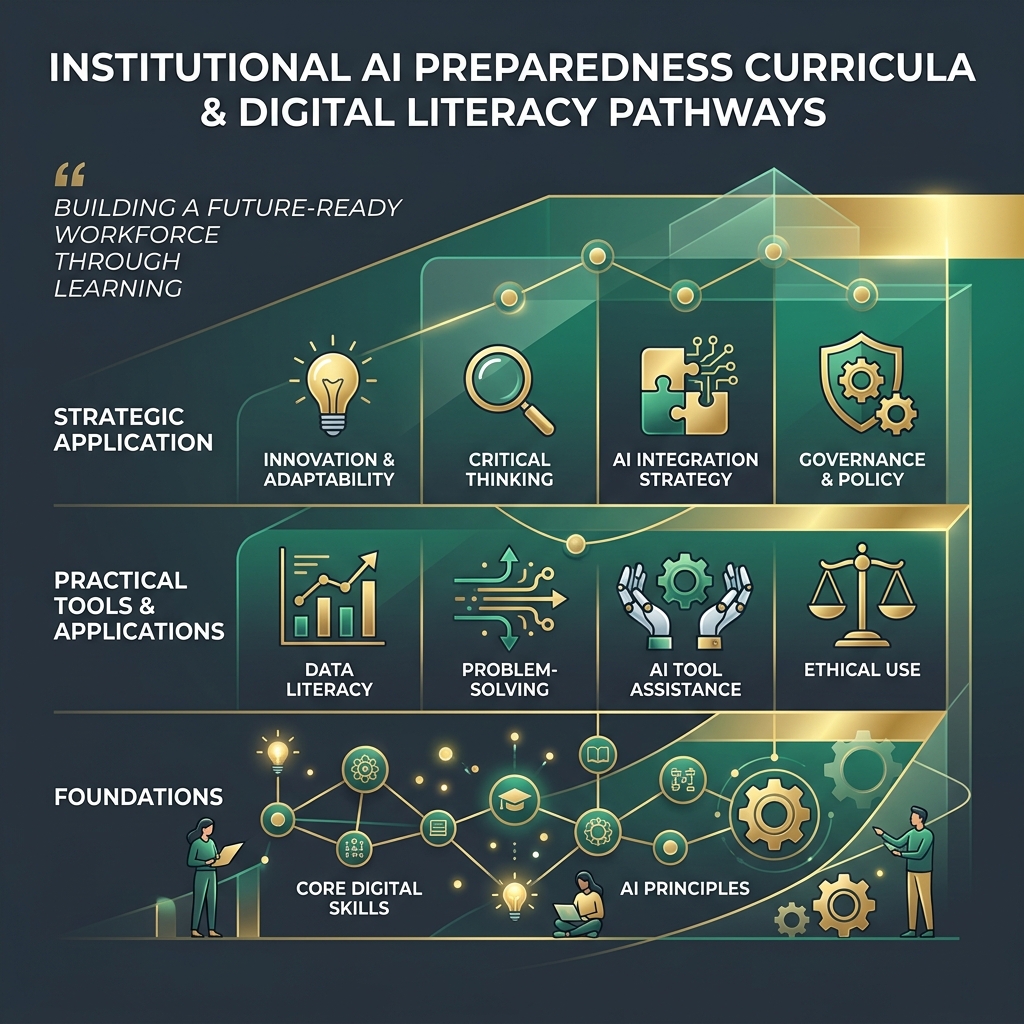
Building a future-ready workforce requires a structured progression: establishing core digital skill Foundations, mastering Practical Tools & Applications, and developing Strategic Application capability.
Explore the curricula below from leading institutions aligned to these learning pathways to build your capability or design training programs for your team.
Google AI Essentials
GoogleA foundational course developed by Google's AI experts. It teaches practical AI skills to boost productivity, covering prompting, AI safety, and identifying biases. Designed for workers across all industries with zero technical background required.
Anthropic Prompt Engineering Tutorial
AnthropicAnthropic's interactive developer and user prompt engineering tutorial. Walks through best practices for eliciting structured, high-quality responses from Claude, including XML tags, pre-filling, and chain-of-thought prompting.
Microsoft AI Learn & Business School
MicrosoftComprehensive learning paths for business leaders, developers, and everyday users. Microsoft's curriculum focuses on responsible AI implementation, generative AI fundamentals, and practical integration in workplace workflows.
The AI Education Project (aiEDU)
aiEDUNonprofit organization creating free, high-quality, and culturally-relevant AI curricula for schools, teachers, and adult learners. Focuses on foundational literacy and demystifying AI's societal and career impacts.
LLM Basics Primer
A plain-language introduction to large language models — what they are, how they work, and what actually matters when you use one. No math required.
Contents
What is a Large Language Model?
A large language model (LLM) is a statistical system trained to predict what text comes next given what came before. It has processed enormous quantities of human-written text — books, articles, code, websites — and learned patterns about how words, sentences, and ideas relate to each other.
It is not a database. It is not a search engine. It does not look things up when you ask a question. It generates a response based on learned patterns about what a plausible answer to your question looks like. This distinction matters enormously in practice.
The "large" in LLM refers to the number of parameters — internal numerical weights — that the model contains. Modern frontier models have hundreds of billions of parameters. More parameters generally (though not always) means more capability and more nuanced understanding of context.
How Does It Produce Output?
LLMs generate text one token at a time. A token is roughly a word or word-fragment. At each step, the model calculates a probability distribution over its entire vocabulary — every possible next token — and selects one, then repeats the process. This is called autoregressive generation.
The selection isn't always the single highest-probability token. A parameter called temperature controls randomness: low temperature makes the model more deterministic and predictable; high temperature introduces more variety and creativity (and sometimes more errors).
The model processes your entire conversation — every message — as one combined input called the context window. This is why LLMs can reference earlier parts of a conversation. Context windows have a maximum length. Once exceeded, earlier content is no longer "visible" to the model.
Token
~¾ of a word on average. "tokenization" = 3 tokens.
Temperature
0 = deterministic. 1+ = creative/unpredictable.
Context Window
The model's "working memory" for a conversation.
Hallucination — And Why It Happens
Hallucination is when an LLM states something false with apparent confidence. It might invent a citation, misquote a statistic, or describe a law that does not exist. This is not a bug that will be fully eliminated — it is a structural consequence of how these systems work.
Because an LLM generates text based on learned patterns rather than verified facts, it has no internal mechanism for distinguishing "I know this is true" from "this sounds like something that would be true here." The model produces fluent, plausible text — fluency and accuracy are not the same thing.
Hallucination risk increases when you ask about: very specific facts (exact dates, names, numbers), recent events past the model's training cutoff, niche or specialized topics, and citations or sources. It decreases when you provide source material and ask the model to reason from it rather than from memory.
Practical Rule
Treat every factual claim from an LLM as a starting point for verification, not a final answer. This is especially true for legal, medical, financial, and policy questions.
Prompting Basics
How you phrase your request significantly affects what you get. This is called prompt engineering — a somewhat inflated term for what is largely careful writing. Key principles:
Be Specific
Vague questions produce vague answers. Instead of "tell me about AI," ask "explain how LLMs are trained, in plain language, for an audience without a technical background."
Assign a Role
Starting with "You are an experienced [X]" shapes the model's style and approach. "You are a careful editor reviewing for clarity" produces different output than the same request without that framing.
Provide Context
Paste in the relevant document, email, or data. Ask the model to work from that material rather than from general knowledge. This dramatically reduces hallucination on specific tasks.
Specify Format
Ask for bullet points, a table, a numbered list, or a paragraph — whatever you actually need. "Give me a three-sentence summary" is more useful than "summarize this."
Iterate, Don't Restart
If the output isn't right, follow up in the same conversation: "That's too long — cut it by half" or "Focus more on the second point." LLMs handle correction well within a conversation.
Knowing the Limits
LLMs have a training cutoff — a date past which their knowledge was not updated. Events, laws, and data after that date are unknown to the model unless you tell it. Ask a model what its knowledge cutoff is before relying on it for recent information.
LLMs cannot take actions in the real world by themselves (unless connected to external tools, which you will typically know about). They cannot check your email, access your files, browse the web (unless explicitly enabled), or make purchases. They respond to text and produce text.
LLMs reflect patterns in their training data, which means they can reproduce biases, outdated perspectives, and culturally specific assumptions present in that data. This is worth being aware of, particularly when using them for decisions affecting people.
LLMs are useful for
- Drafting and editing text
- Summarizing documents you provide
- Brainstorming and ideation
- Explaining concepts
- Writing and reviewing code
- Translating languages
Verify before relying on
- Specific statistics and numbers
- Legal or medical claims
- Events after training cutoff
- Citations and sources
- Niche or specialized facts
- Information about real people
AI and Your Work
OCF's research focuses specifically on how AI displacement is affecting workers — particularly in rural and economically vulnerable communities. This is not abstract. LLMs are already being deployed in roles that involve writing, customer service, data entry, paralegal work, and administrative tasks.
Understanding how these tools work is, increasingly, a form of workforce readiness. Not because everyone needs to become a developer, but because workers and institutions who understand what these systems can and cannot do are better positioned to advocate for themselves, adapt, and contribute to decisions about how AI is used.
OCF's Workforce Readiness research series is available free on our Research page. The papers examine these dynamics through an access-centered, evidence-based lens.
From OCF Research
"Access is not merely an enabling condition — it is a binding constraint. Where it is absent, readiness is irrelevant."
— OCF Workforce Readiness v5.1, 2026
Read the research →Quick Reference
Key Terms at a Glance
LLM
Large Language Model. A statistical text prediction system trained on large datasets.
Token
The unit of text the model processes. Roughly ¾ of a word. Used to measure input/output length.
Context Window
The maximum amount of text a model can "see" at once. Content beyond this limit is invisible to it.
Hallucination
When a model states something false with confidence. A structural feature, not a fixable bug.
Temperature
Controls output randomness. Lower = more predictable. Higher = more varied (and error-prone).
Training Cutoff
The date after which the model has no knowledge. Events after this date are unknown to it.
Prompt
The text input you give a model. Prompt quality significantly affects output quality.
RAG
Retrieval-Augmented Generation. The model pulls from a document database at query time — reduces hallucination.
Fine-tuning
Additional training on domain-specific data to specialize a base model for particular tasks.
Observable Compute Foundation
Questions? Reach us directly.
We are a small nonprofit doing independent research. If you have questions about these tools, our research, or AI readiness resources for your community or organization, we want to hear from you.
Contact OCF →